Advertiser | Analytics
Analytics (/advertiser/analytics) shows performance metrics across your campaigns with date filters, breakdowns, and export.
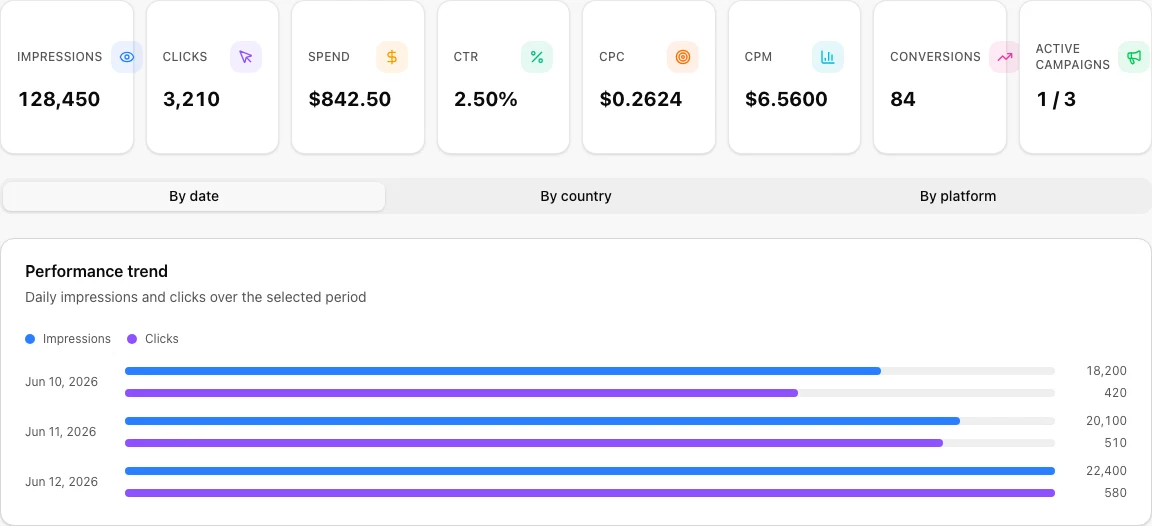
Overview
- KPI cards: Impressions, clicks, CTR, spend, and related totals for the selected range
- Date presets: Quick ranges (7d, 30d, custom) to compare periods
- Trend chart: Visualize impressions, clicks, or spend over time
Breakdowns
Use tabs to slice performance by:
- Campaign
- Placement / format
- Date
The campaign table lists each flight with status, spend, impressions, and clicks.
Sync and export
- Sync now: Pull the latest delivery stats from the ad network (AdsGram sync)
- CSV export: Download the current view for reporting or client decks
Data also updates when you use Refresh on the Dashboard or Campaigns pages.