

One link for every Telegram app you build
Publish a public creator page on TG.app with every approved Mini App, bot, channel, and group under one vanity URL. Private by default. Built for Telegram bios and word of mouth.
1 URL
For your whole portfolio
Apps, bots, channels, groups
Private
Until you publish
Opt-in visibility by default
2 min
To go live
From Creator Studio Profile
Free
To create and share
No fee for the public page
A portfolio page built for Telegram distribution
Fans should not hunt across five Telegram links. Your creator page is the share surface; the catalog does the rest.
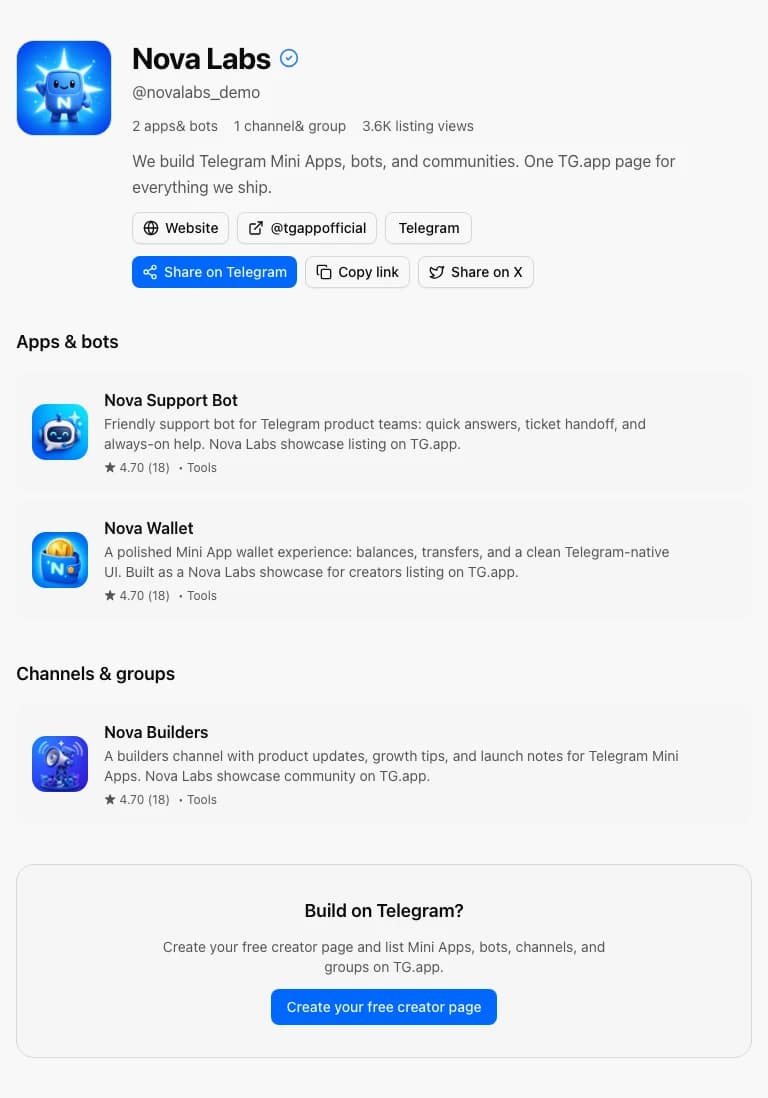
See a model creator page
Demo showcase with cover, Mini App, bot, and channel under one brand. Marked as demo and hidden from the catalog. Open it, share it, then build your own under the same pattern.
- Display name, @username, and verified badge
- Apps, bots, and communities in one scroll
- Share to Telegram, copy link, or X in one tap
Publish in three steps
Everything lives in Creator Studio Profile. No separate dashboard to learn.
- 1
Set up your profile
Open Creator Studio → Profile. Choose a display name, bio, cover image, and friendly URL under /creators/.
- 2
Publish when ready
Toggle Make profile public. Visitors see only approved Mini Apps, bots, channels, and groups you own.
- 3
Share everywhere
Paste the link into your Telegram bio, pin it in your channel, or embed the website badge on your site.
Frequently asked questions
Straight answers for creators setting up a public profile on TG.app.