One Link for Every Telegram App You Build: Public Creator Pages on TG.app
Creators can now publish a public profile at tg.app/creators/you with every approved Mini App, bot, channel, and group in one shareable link. Private by default. Built for Telegram bios and word of mouth.

Your fans should not hunt across five Telegram links to find what you shipped. TG.app now gives every creator an optional public page: one vanity URL for all approved Mini Apps, bots, channels, and groups.
What you get
- A page at
tg.app/creators/your-namewith your display name, Telegram@username, bio, and listings - Private by default: you choose when to go public
- Share controls: Telegram, X, copy link, ready channel post, and a “paste into Telegram bio” helper
- A small website badge (
Find me on TG.app) that points back to your creator page - “Created by” on listing pages that links to your public profile when it is live
Example: Nova Labs (demo)
Here is a model public creator page with a Mini App, a bot, and a channel under one brand:
Live demo: tg.app/creators/nova-labs
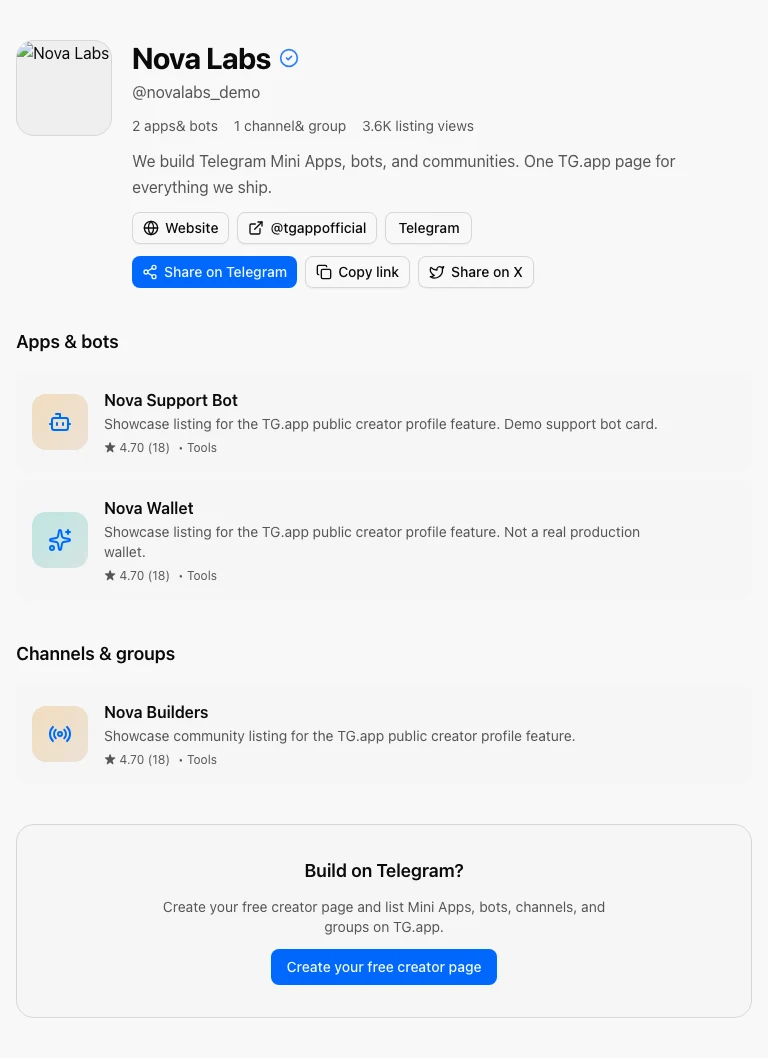
Visitors see your stats, bio, links, and every approved listing. One share button for Telegram, X, or a copied URL for your bio.
How to set it up in Creator Studio
Open Creator Studio → Profile. The new Public page card is where you publish:
- Pick a profile URL (
tg.app/creators/…) - Toggle Make profile public
- Save, then share on Telegram or copy the URL into your bio
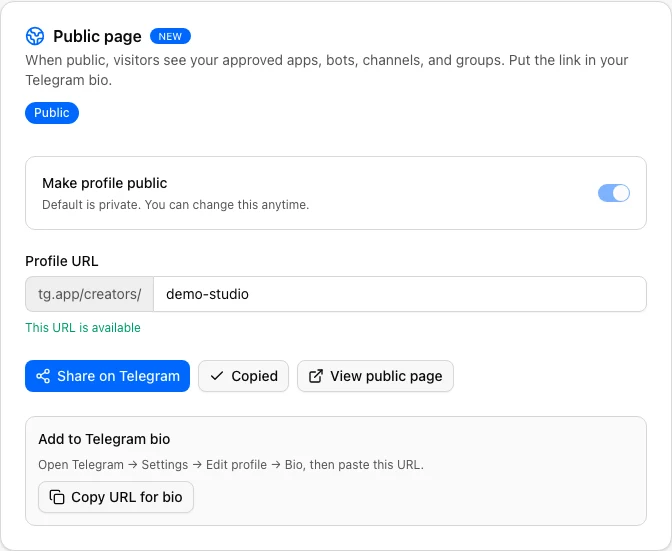
When the page is live, Creator Studio surfaces share actions so you can post the link without hunting for the URL:

If you have no approved listings yet, you can still publish, but the page will look empty. Wait for at least one live listing when you can.
Why this matters for growth
Telegram distribution is fragmented by design. Creators already ship apps, bots, and communities. A single catalog page turns that portfolio into a usage loop: share → visitor browses listings → opens Telegram → discovers TG.app → more creators list.
Put the link in your Telegram bio. Post it when you launch. Pin it in your channel. The page is the share surface; the catalog does the rest.
Already live on TG.app?
Claim or edit your listings, then publish the page so every asset sits under one brand. New creators can start at Become a creator or read the short overview on Creator profiles. Builders inviting builders can still use the Referral Program for ad credit.
Docs
Full details: Creator Studio | Profile.
Be the first to react
Comments
No comments yet. Be the first to share your thoughts!